Make your own stickers from family photos, no uploads
The simplest way to turn family photos into stickers is to do it on the iPhone itself: touch and hold the person in a photo and iOS lifts them out. To send that cut-out in WeChat without a white box around it, it has to be saved as a transparent GIF. Snipmoji is the app I made for this. The cut-out, the white border and the GIF export all happen on the phone, and your photos are never uploaded.
Where it started: my family, as stickers in the family chat
Most of what gets passed around our family group chat is the same few sticker packs everyone has seen online. One day I thought it would be a lot more fun if the faces in those stickers were our own.
Photos of the kids most of all. But a plain cut-out is a still image. It doesn't move, so it can't be an animated sticker. Luckily, photos taken on an iPhone are already Live Photos, which makes them a natural fit for animated stickers.
I looked at a few sticker apps on the App Store and then hesitated. To make a sticker, I'd have to hand my family's photos over to them. Would those photos be uploaded to a server? Where would they be kept, for how long, and could they be used for something else? Most of the descriptions were vague about this, and I had no way to check. With my own photos I might have accepted the risk. With my family's, I wasn't willing to.
So I decided to make my own: the photos never leave the phone, and everything from the cut-out to sending happens on the device.
What the built-in option does well
To be fair, the iPhone can already cut subjects out. In Photos, touch and hold the subject and you can copy it or add it as a sticker. If you only send in iMessage, or just want to keep it, the built-in feature is enough.
The trouble starts when you send it in WeChat. Paste the cut-out into a chat and it's treated as an ordinary image, flattened onto white. Stickers made from Live Photos stop moving, too. WeChat only keeps transparency for GIFs, so to stay transparent after sending, the cut-out has to be saved as a GIF.
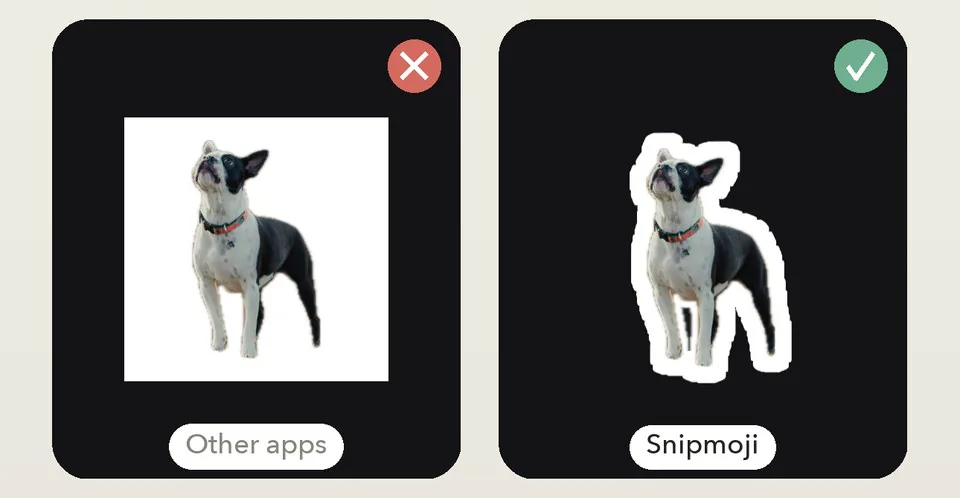
Why the photos don't need to be uploaded
Subject detection uses Apple's Vision framework and runs on the iPhone, so no server is involved. That's why Snipmoji has no servers, no account, no ads and no analytics. A photo goes in, a sticker comes out, and every step in between happens on the phone.
You don't have to trust anyone's privacy promise, because your photos have nowhere to go.
After the cut-out: add some effects
The cut-out is only the start. A sticker for the family chat should have a bit of personality, so after cutting out you can add:
- Borders: solid, dashed, chalk and neon, with adjustable thickness and colour. The one you'll use most is the white edge of a real die-cut sticker, and you can change it any time without cutting out again.
- Border motion: turn it on and the dashed border marches, chalk jitters, and neon breathes or cycles colour. That's how a still photo becomes an animated sticker.
- Effects: burst lines, sparkles and stars scattered around the sticker, with adjustable placement and amount. Add a ring of burst lines and you have a "shocked" or "smug" face.
- Doodles: a line pen, a glow pen and pattern brushes, to circle something or draw on a little prop.
- Text: a sticker usually needs a caption. There are nine faces, including two made for each of Chinese, Japanese and Korean.
- Filters and adjustments: six filters and six adjustments, to brighten an old photo or give a set of stickers one look.
- Frame picking and speed: a Live Photo is cut out frame by frame into a looping GIF. Drop the blurry frames and make it faster or slower. A change of expression caught on camera becomes a ready-made animated sticker.
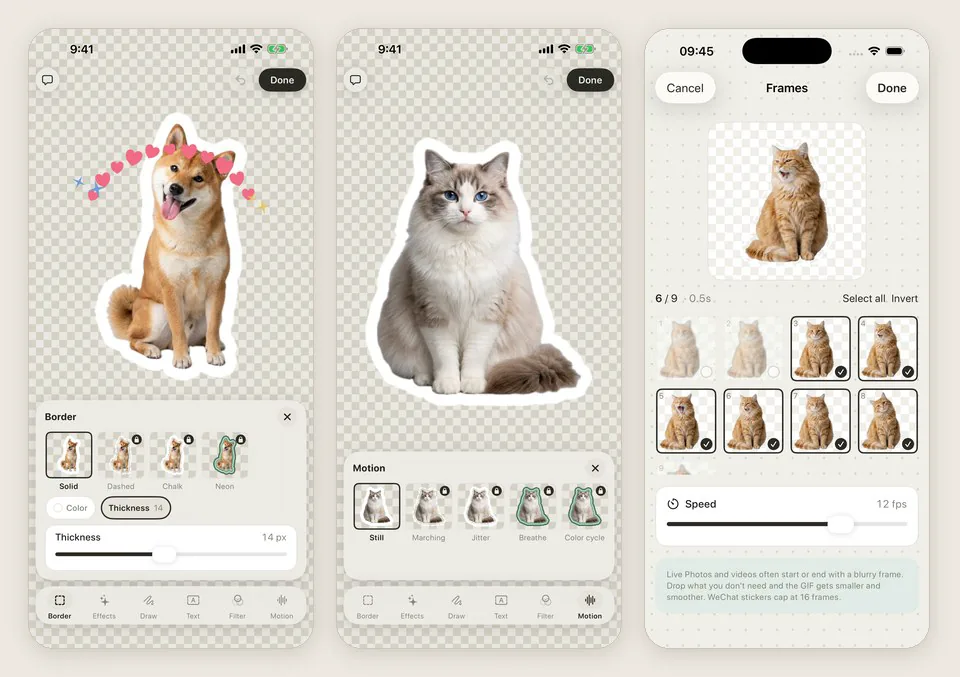
All of these work on animated stickers too, and none of them touch the original, so you can take them off at any time. Paid effects can be tried freely; you're only asked when you save, and if you don't want to buy, you can drop them in one tap and save anyway.
Finished stickers are kept in a library, grouped by date and tagged however you like. When you want to send one again, you don't have to make it again.
Cut-outs can live on your Home Screen too
Along the way I found that cut-outs of the family aren't only for the group chat.
- Make a wallpaper: fifteen cute patterns. Put your stickers on top and save a Lock Screen and Home Screen pair at your phone's resolution.
- Put them in a widget: a desk pet, a carousel, a day count and a collage. You can pat the desk pet, flip through the carousel, and use the day count for a date that matters, like a child's birthday or moving into a new home.
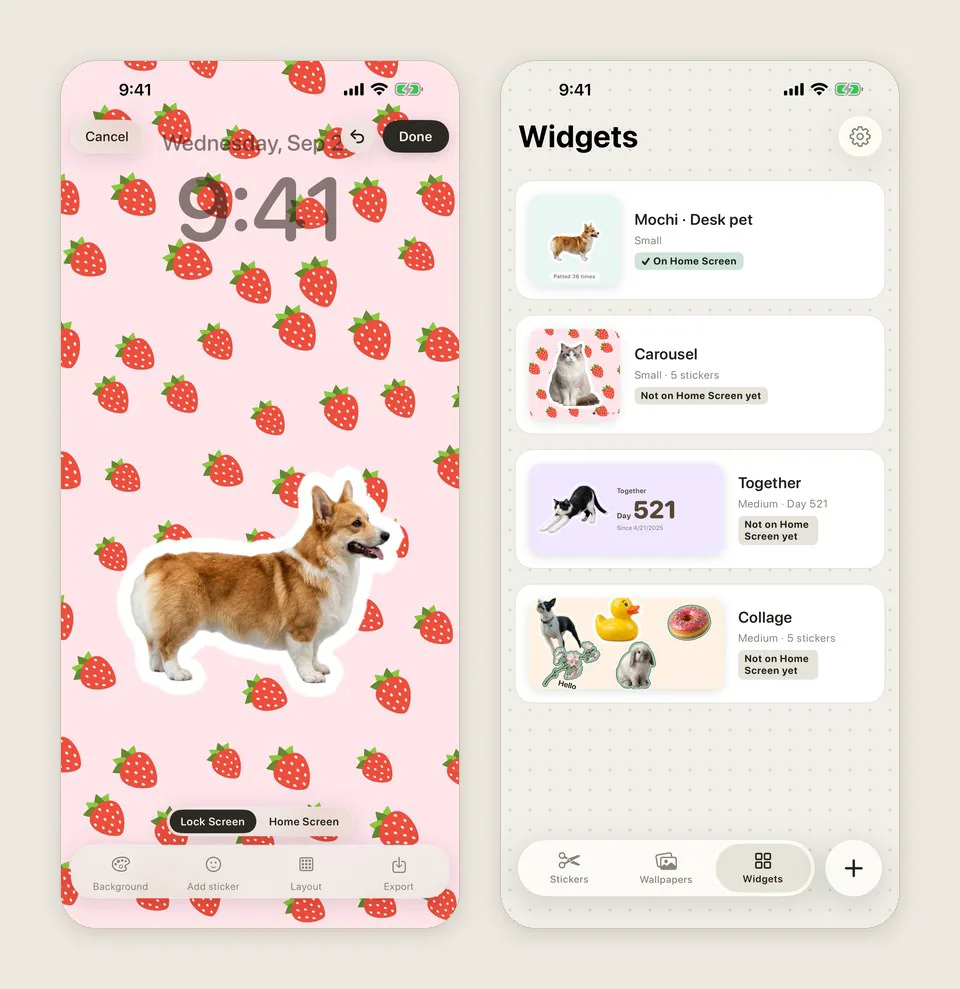
The same goes for friends. It's rare to get everyone together for a group photo, but you can cut each person out separately and put them on one wallpaper, or in a collage widget.
And it's not only people. Pets, plants, anything you like in everyday life: take a photo and you can cut it out.
Which chat apps can you send them in?
Snipmoji exports transparent GIFs, so most chat apps that accept GIF or PNG will work:
- WeChat: tap Send to WeChat on the sticker and pick a contact. Or save it to Photos, then in a chat tap + → Album and pick the GIF.
- QQ and LINE: save to Photos, or copy or share straight from Snipmoji.
- iMessage, Telegram, WhatsApp and Discord: pick the GIF from your photo library in the chat, the same way.
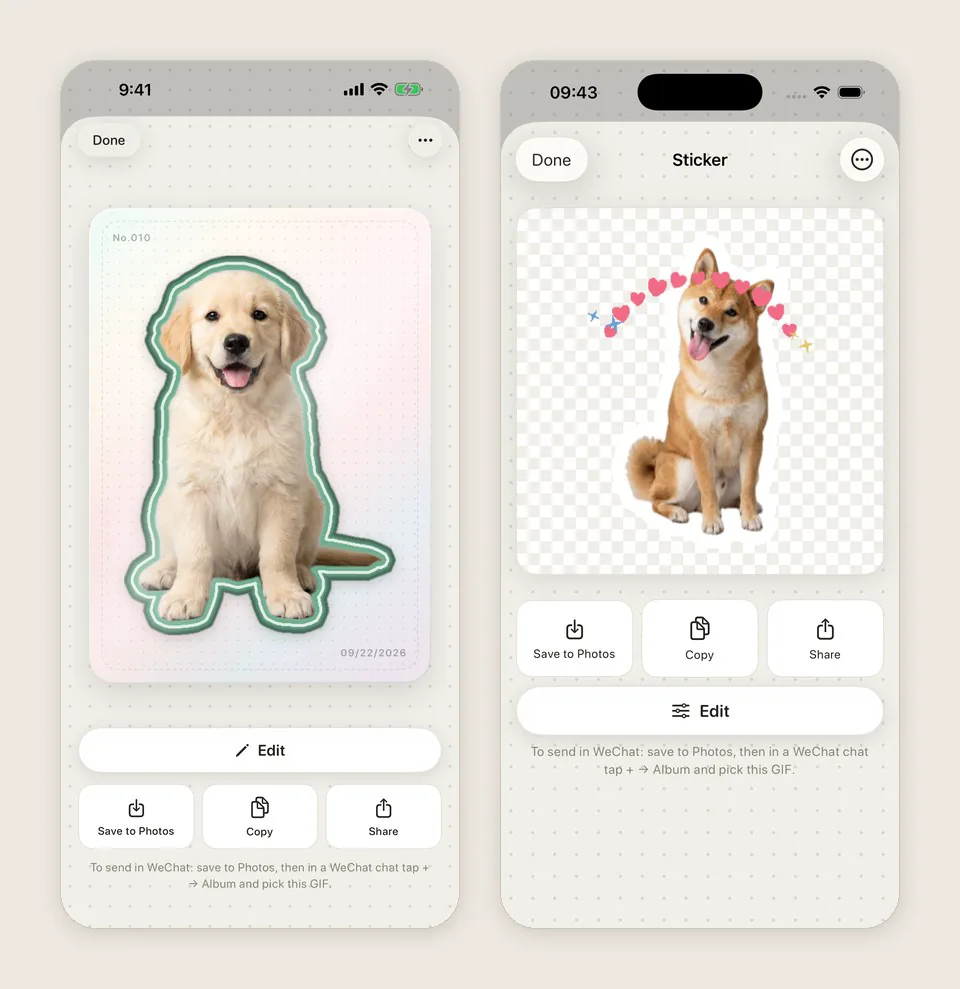
I haven't tested every app one by one: work apps like Slack, Lark, DingTalk and WeCom, or direct messages in Instagram, Messenger, Douyin, Xiaohongshu and Weibo. Save the sticker to Photos and send the GIF once in a chat to find out. If it arrives with a white background, doesn't move or won't send at all, please email info@miramiao.com and tell me which app, your iPhone model and iOS version, and I'll test it.
About pricing
Cut-outs are never charged per use and nothing is counted. Stills and Live Photos alike, the white border, the transparent GIF, and sending, saving, copying and sharing are always free. The library holds 20 stickers. Wallpapers with solid colours and two patterns, and one widget of each kind, are free too.
More borders and motion, effects, faces, filters, an unlimited library, every wallpaper pattern and more widgets are a one-time $4.99 purchase, not a subscription.
If you only make one now and then
If you only send in iMessage, the built-in cut-out is enough. If you want stickers to stay transparent in WeChat, QQ and other chat apps, want Live Photos to move, or care whether your family's photos get uploaded, that's when an app is worth installing.
And before turning family photos into stickers, ask them if they're happy with it.