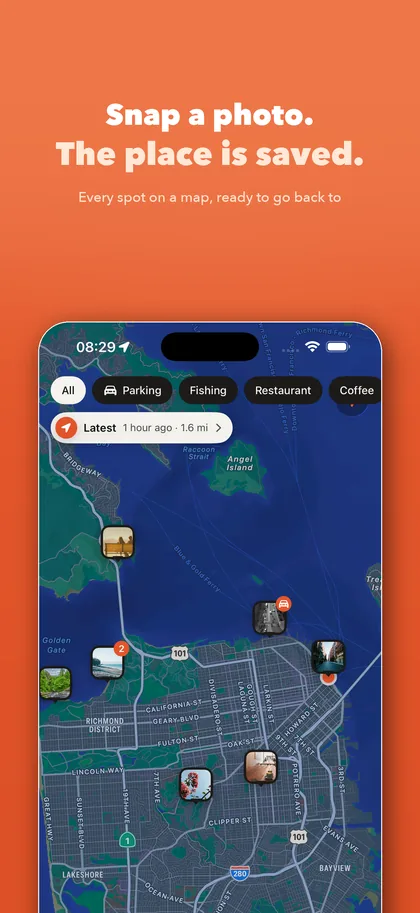
My saved places in Maps became a mess of stars, so I made a photo-first map pin app
The saved places in a maps app work best for places that have a name: a shop, a landmark. Search, tap, saved. Once the list grows, or the places you save have no name on the map, it starts to fall short: all you have is a pin and an address, and you can't remember why you saved it or what it looked like. Shotpin is the map pin app I made for this. Press the shutter and the photo and location are saved together; when you want to go back, it hands the route to the maps app you already use.
Where it started: my saved places became a mess
After using a navigation app for a long time, I had saved a lot of places. Some were places I go often. Some were temporary, somewhere I'd need to come back to in a few days to get something done. Others were parking spots and hotel addresses saved while traveling.
The more I saved, the worse it got. Open the map and the screen was full of stars, with no way to tell which was which. I had to tap them one by one and piece it together from memory. Every so often I had to clean them up, because some of them weren't needed any more.
I had also saved quite a few hospitals and shopping malls, but there was no way to see them separately: which ones were hospitals, which were malls.
Parking was the same. I never bother to remember which level and which bay the car is in, so I just take two photos: one of the license plate and the bay number, one of roughly where the car is. When I come back, I open the photos and know where it is.
Then one day I left a mall and went somewhere else. When I needed to get back to the car, I couldn't remember which direction the mall was in. I opened Photos on my iPhone. The photos clearly had the location in them, but there was no way to hand that location to my navigation app. All I could do was stand there, frustrated.
What I wanted was simple: a photo I take should be a place I can navigate back to.
What the built-in saved places do well
To be fair, the saved places built into maps apps are often enough.
- Places with a name: shops, landmarks, offices. Search, tap to save, and it's in the same app you navigate with. Sign in on a new phone and they're still there.
- One maps app, not many places: just save them there. No need to install anything else.
- Places without a name: you can touch and hold the map to drop a pin.
If most of what you save looks like this, you don't need another app.
Where they fall short
The trouble starts in these cases.
- You save a pin, not what the place looks like. A fishing spot by the river, a viewpoint on a hill, a particular pillar in an underground car park, a small shop with no sign down an alley: none of them have a name on the map. Drop a pin and all you're left with is an address. A few months later you can't tell where it is or why you saved it. A photo from the spot, you'd recognize at a glance.
- Saving means deciding on the spot. Open the map, find the place, name it, pick a list. When you're actually standing there, you often don't have time for all that, so it doesn't get saved.
- You can't filter by your own categories. Hospitals, malls, regular places, temporary ones, all mixed together. Seeing just one kind, or finding a place by the line you jotted down at the time, isn't always possible.
- Your saved places stay in that one maps app. Some are in Apple Maps, some in Google Maps. Switch to another maps app and you have to save them all over again.
My approach: replace "save" with "snap"
Shotpin doesn't ask you to decide whether to save, what to call it or which list it goes in. Press the shutter and it's saved. Sorting can wait.
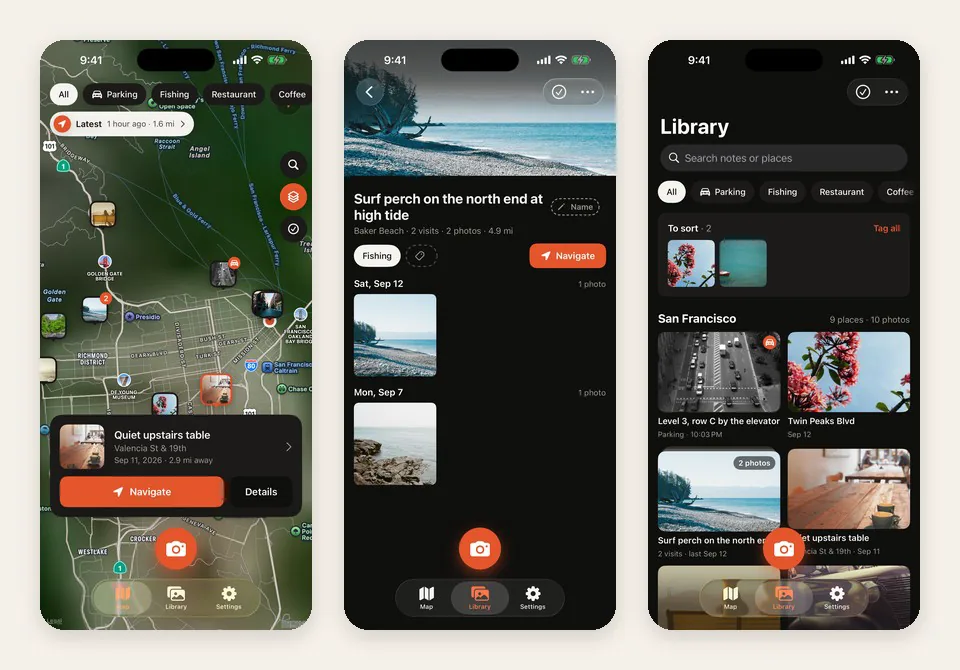
- Snap = saved. The app opens straight into the camera. Press the shutter (or the volume button) and the photo and exact location are stored. No forms, no typing. You can also snap from the widget, Control Center, the Lock Screen or the Action button.
- The photo is what the place looks like. Photos taken at the same place stack into one, with a count of how many times you've been there. They're kept inside Shotpin, not in your Photos library.
- Names and notes, in your own words. Call a place Civic Sports Center instead of the street address. Add a note to a photo: "Level 3, pillar 7, exit by the pharmacy", "the table by the window", "closed on Tuesdays".
- Search finds it. Search place names, notes, addresses and cities, instead of tapping through the map one pin at a time.
- You decide how to sort. Make your own tags: Parking, Fishing, Restaurant, Coffee, or anything else. Filter by tag on both the map and the library.
- Save places you haven't been to yet. Touch and hold the map, or search for an address, and save it first. When you get there and take a photo, it joins that place on its own.
- One mountain, one place. The car park, the halfway stop and the summit are three places by distance. Select them, merge them into one, and choose which pin the map and Navigate should use.
- Navigate with the maps app you already use. Apple Maps, Google Maps, Waze, Amap or Baidu Maps. Pick one once and Shotpin remembers it.
Your saved places, in your hands
Shotpin has no account, no analytics and no ads. Unless you turn on sync, nothing leaves your phone.
If you switch phones or use more than one device, you can sync to iCloud Drive or to your own storage: WebDAV, S3-compatible storage, or any folder in the Files app. Your data lives where you put it, not inside any one maps app.
You can also import photos you've already taken. Shotpin reads the location from each photo and turns it into a place.
About pricing
The free version holds up to 50 spots and 5 tags, with the map, navigation, full-screen viewer and sharing included.
Unlimited spots and tags, sync to iCloud or your own storage, importing from Photos, saving every shot to Photos as well, and app lock are a one-time $4.99 purchase, not a subscription. Family Sharing is supported.
When you don't need it
If what you save is mostly shops and landmarks with names, and you only use one maps app, its built-in saved places are enough.
If you want to remember places that have no name on the map, see what they looked like, find them again by your own words, or keep your saved places from being locked into one maps app, that's when a map pin app is worth installing.
I didn't make Shotpin for any one kind of person. Everyone uses it differently: some save fishing spots, some keep track of places they've traveled to, and some need it for work. I believe it can help some of them.
 ShotpinSnap a spot, navigate back.
Take one photo and the place is saved. Every spot on a map, directions back in one tap with Apple Maps, Google Maps, Waze, Amap or Baidu. Find your car without thinking.