Litepad
A notepad that opens instantly. Good with code, too.
Litepad is a text and code editor for Mac that's ready the moment you open it. Large log files open and scroll smoothly, one shortcut brings it up from any app, and scratch notes save themselves. It does far more than the built-in TextEdit without the weight of a full IDE, and Litepad Pro shows exactly what AI changed in your code.
Screenshots
What it does
- Devices
- Mac
- Platform
- macOS 14 or later
- Category
- Developer Tools
- Price
- Free · Pro $9.99, one-time
- Languages
- English · 简体中文
The built-in TextEdit is too basic, and a full IDE is heavy and slow to start. Litepad sits in between: jot a quick note, read a log, fix a few lines of code, and it's ready the moment you open it. With more and more code written by AI, Litepad Pro lets you see what it changed without opening an IDE.
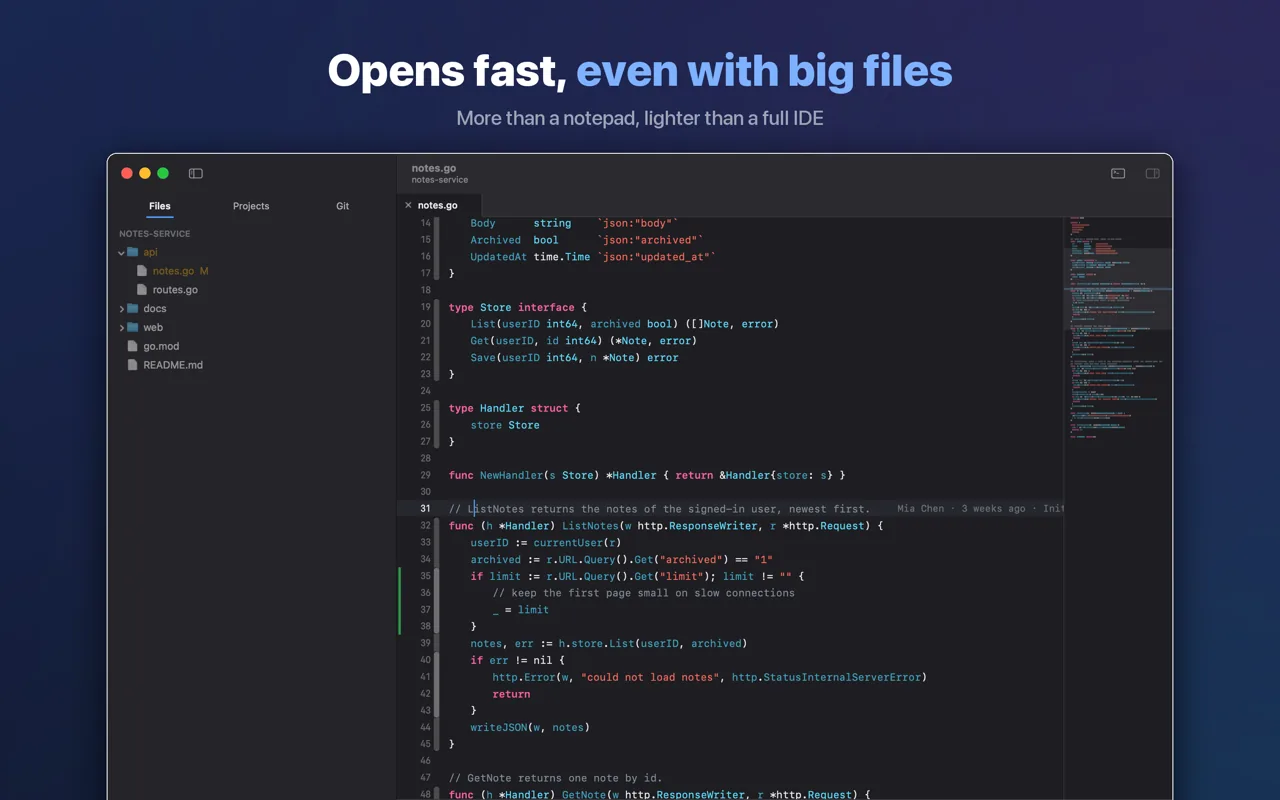
- Ready the moment you open it. Start typing right away. Large log files open and scroll smoothly, and typing stays responsive however long the file gets.
- There when you need it. Press one shortcut in any app and Litepad appears on the desktop you're on; press it again to put it away. It can also live in the menu bar instead of the Dock.
- Scratch notes that save themselves. No file name to think of, nothing to remember to save.
- Change several places at once. Type in several places at once, or select a word and then each next match to change them together. Lines move and duplicate with shortcuts, and every shortcut can be changed to suit you.
- Dozens of languages, color-coded. A minimap of the whole file sits on the right and long sections fold away. As you type, Litepad suggests words already used in your open files, with no plugins to install.
- Find it, point to it. Find and replace in one file or across a folder, with regular expressions when you need them. Right-click to copy the file's path with the selected line numbers, so anyone can find the exact spot.
- Markdown and CSV, previewed as you write. Tables, code blocks and images update as you type. Images open right in the editor, too.
- Your projects, one click away. Favorite the folders you use most; recent ones are listed alongside.
- Files from Windows, intact. Older files and files saved on Windows open without garbled characters and are saved back the way they came. Their line breaks are kept, so editing one line doesn't turn the whole file into a change in Git.
- See what AI changed (Pro). Look at just what isn't committed yet, a whole branch, or everything since any earlier commit, including what an AI assistant has already committed. Changed lines are marked beside the line numbers; jump between them with ⌃. and ⌃,, and compare any file side by side.
- Who changed each line (Pro). Wherever the cursor rests, the end of the line shows who last changed it, when, and in which commit.
- Go to definition, format on save (Pro). Jump to a definition, list every place a name is used, and hover over a name to read its notes; code is tidied automatically when you save. 12 color themes and an optional frosted-glass window.
- No subscription, no account, no data collected.
Pricing
Free
The free version is a complete editor: the summon shortcut, scratch notes, multiple cursors and line editing, color-coding for dozens of languages, completion, find and replace across a folder, and Markdown and CSV previews all work. There are only three limits: up to 5 tabs per window, your 10 latest scratch notes, and 3 favorite projects.
Pro$9.99one-time
Litepad Pro is a one-time purchase ($9.99), not a subscription: Git comparisons (uncommitted changes, a whole branch, or everything since any earlier commit), the last change shown at the end of the line, go to definition and find references, format on save, and all 12 color themes with an optional frosted-glass window. It also removes the three limits of the free version. Family Sharing is supported.
Questions
Didn't find your answer?
Questions, bug reports and feature requests are welcome by email. Replies usually come within a few days.
info@miramiao.com → Support →Is there a Notepad for Mac?
Yes. The built-in TextEdit works as a notepad once you choose Format › Make Plain Text. If you also want syntax colors, multiple cursors, smooth scrolling through large log files, or a shortcut that brings the editor up from any app, Litepad is free to download.
How do I bring Litepad up from anywhere?
Press the summon shortcut, Control-Option-Space by default. The window appears on the desktop you're on, in front of other apps; press it again to put it away. You can change the shortcut in Settings › General.
Do files saved on Windows open correctly?
Yes. Older files and files saved on Windows, including Chinese text in legacy encodings, open without garbled characters and are saved back in the encoding they came in. Windows line breaks are kept too, so editing one line doesn't turn the whole file into a change in Git.
Does it run on Intel Macs?
Not at the moment. Litepad requires a Mac with Apple silicon and macOS 14 or later.
Is it free?
The download is free and the free version is a complete editor, with three limits: 5 tabs per window, your 10 latest scratch notes and 3 favorite projects. Litepad Pro is a one-time $9.99 purchase, not a subscription. It removes these limits and unlocks Git comparisons, the last change at the end of each line, go to definition, format on save and every color theme.
Does Litepad collect my data?
No. There is no account to create, and no data is collected.