
Rollshot
Scroll once, get the whole page.
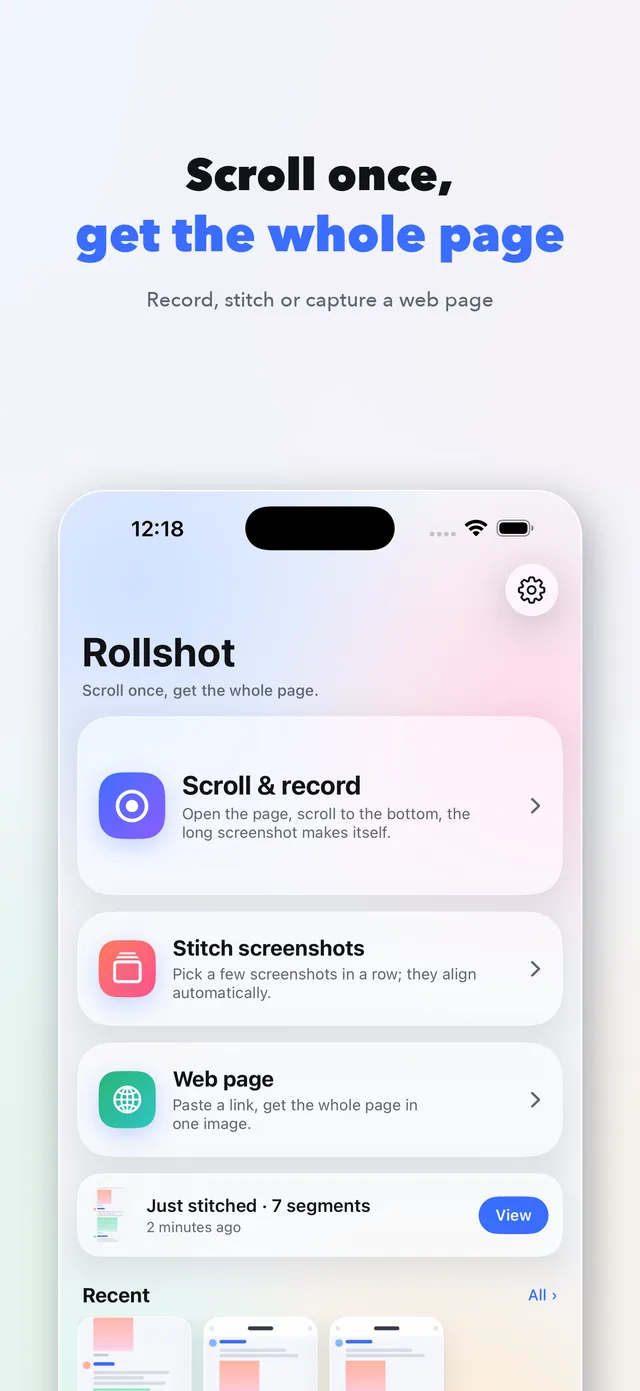
Rollshot is an iPhone and iPad app that makes long screenshots: start a recording, scroll to the bottom, and the whole page is stitched into one tall image on the device.
Screenshots
What it does
- Devices
- iPhone · iPad
- Platform
- iOS 17 or later
- Category
- Utilities
- Price
- Free · Pro $4.99, one-time
- Languages
- English · 简体中文 · 繁體中文 · 日本語 · 한국어 · Français · Deutsch · Español · Português
iPhone still has no built-in long screenshot outside Safari. Rollshot fills that gap without the usual traps: the three ways of making one run free all the way to export at full resolution, sticky headers are kept once instead of repeated at every seam, and a seam that might be missing content is marked instead of silently glued. What you normally do before sharing — blurring out, watermarking, keeping just the subtitle lines — happens in the same app, so you never have to move the image to another editor. There is one Pro, bought once.
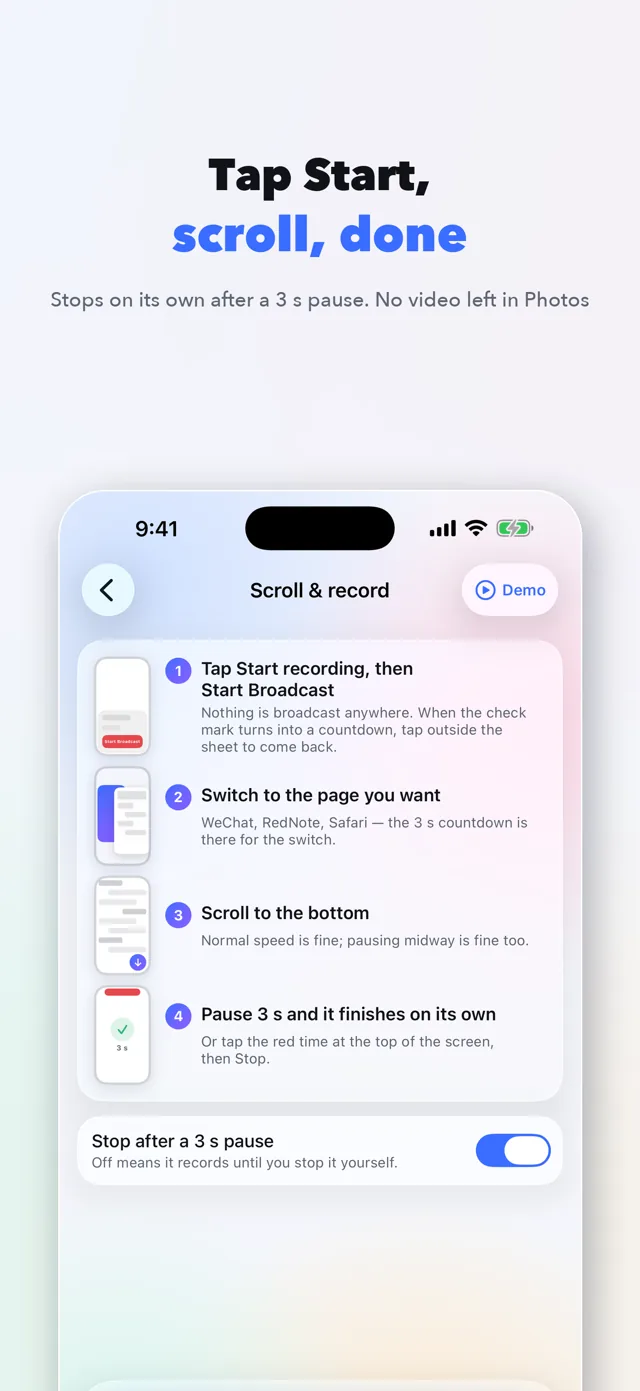
- Scroll & record. Tap Start, go to the page, scroll down. Pause three seconds and the long screenshot is ready. No video is left in Photos.
- Stitch screenshots. Pick a few screenshots in any order. They are lined up by content, and the one that doesn't match is marked, not guessed.
- Web page. Paste a link and get the whole page as one image, rendered on your phone.
- Seams you can see and fix. Drag the lower part into place or delete a segment. Sticky headers kept once; status bar and scrollbar removed.
- Blur out. Brush over anything you want hidden, as pixels or blur. In a group chat, hide every avatar at once. The pixels are really gone, not covered by a box.
- Tiled watermark. Grid or staggered, with the text, density, angle, opacity and colour you choose. Added to the exported copy only; your original is untouched.
- Subtitle stitching. Keep just the subtitle line from a few movie screenshots, stacked into one image. Or hand it a video clip and every line becomes a strip.
- Export without the trap. Original, WeChat-friendly or custom width, with file sizes shown. Crop, save, share, or export a PDF.
- Nothing leaves your phone. No account, no ads, no analytics. Screenshots are picked with the system picker; no photo library permission, and your images are never uploaded.
- Made for iPad, not stretched. The long shot fills the screen while seams, cleanup, blur out and export sit beside it, so you never scroll away from the image to change a setting.
Pricing
Free
All three ways of making a long screenshot, full resolution, any length, cleanup, seam editing, crop, three export sizes. A small signature line under the image (croppable) and a library of your latest 20. Blur out, watermark and subtitle stitching can be previewed for free.
Pro$4.99one-time
Subtitle stitching, tiled watermark, blur out, PDF export, custom export width, no signature line and an unlimited library. One purchase, Family Sharing supported. No subscription, no second tier.
Questions
Didn't find your answer?
Questions, bug reports and feature requests are welcome by email. Replies usually come within a few days.
info@miramiao.com → Support →Does Rollshot leave a screen-recording video in Photos?
No. Only the key frames needed for stitching are kept inside the app. The only thing that reaches your library is the long screenshot you save.
Does blur out really remove the content, or just cover it?
It really removes it. At export that area is redrawn as pixelated or gaussian-blurred pixels, so the original content is not in the file. It is not an opaque shape laid on top.
Does it work on iPad?
Yes, and iPhone and iPad are one purchase. On iPad the layout is rebuilt rather than stretched: the entries and your library stay in a sidebar, and on the result screen the long shot fills the canvas while seams, cleanup, blur out and export sit in a panel beside it. On Apple-silicon Macs it runs as a Designed for iPad app.
Which apps can I capture?
Anything that scrolls: chats, feeds, articles, orders, settings. Recording is done by iOS, so it works in every app.
What if a seam is wrong?
Tap the seam handle on the result page, drag the lower part until the content lines up, or delete the segment. Seams that might be missing content are marked in orange.
Do the screenshots I stitch need to be in order?
No. Rollshot sorts them by content. Adjacent shots only need to overlap a little, even a line or two of text. Subtitle stitching is the exception: there the order you picked is kept, because only you know which line came first.
Is Rollshot Pro a subscription?
No. Pro is a single purchase of $4.99 through Apple, with Family Sharing. There is no second tier and no ads.
Does the app need an internet connection?
Only the web page feature loads the URL you enter, directly from that site. Everything else works offline and your images are never sent to us.
More work
 LitepadA notepad that opens instantly. Good with code, too.
 ShotpinSnap a spot, navigate back.
 SnipmojiAny photo into a sticker. Sent transparent.
 PrismSlice photos into rainbows.
 BrainwarmA few minutes of brain practice a day. Only against yourself.
 KnockboxOne curl, your phone buzzes.
 BoxfoldCut the whole sheet into boxes.
 FliptenSwap and they flip. Make 10 and they clear.
WeChat can’t open the App Store
Tap the three dots in the top right, then “Open in Browser”.